
Did you miss Catalyst?
We’ve got you covered. Every session is here, ready to stream on demand.


Aur0ra Ransomware: Silent encryption targeting windows shadow copies
By: Shreyansh Shankhdhar
Executive Summary
Cohesity REDLab has released update to its threat library in response to active exploitation using Aur0ra ransomware. Aur0ra is a 64-bit Windows ransomware that skips the one signal most detection rules rely on: a new file extension. Aur0ra encrypts file contents in place, so a .docx stays a .docx and a .jpg stays a .jpg — the file just quietly stops opening. By the time an employee notices, Aur0ra has typically already deleted every Volume Shadow Copy, shrunk the shadow storage allocation so new ones can't be retained, and disabled the System Restore scheduled task.
The sample carries a forged compile timestamp nearly two decades in the future and carries shadow-copy-destruction commands directly in its binary. It arrives inside a ZIP archive, rewrites file permissions it doesn't already hold, and encrypts using a multi-threaded worker pool.
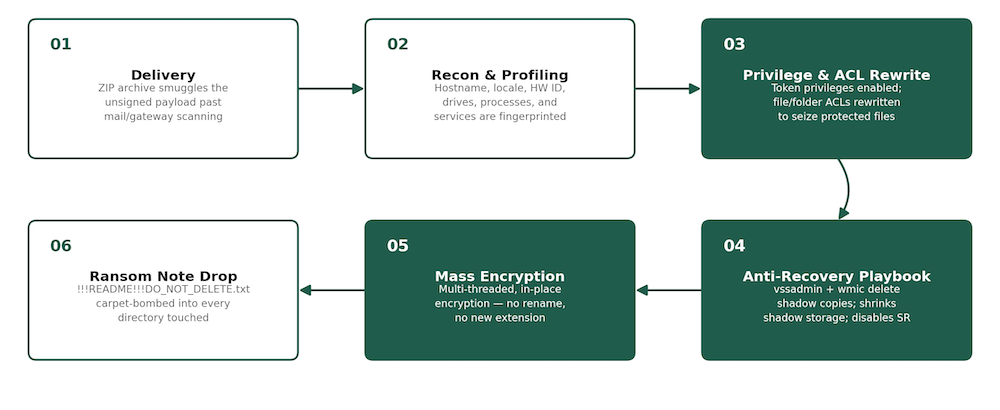
Figure 1: Aur0ra attack flow, from archive delivery to ransom note drop
Delivery, Profiling & Privilege Grab
The sample ships inside a password-light ZIP archive to slip past gateway scanning. The extracted payload is a 154 KB, unsigned PE32+ executable with no version metadata and a PE header claiming a compile date of August 26, 2041 — deliberate “timestomping” to muddy forensic timelines. On execution it fingerprints the host (hostname, locale, keyboard layout, hardware IDs, running processes and services — geofencing and anti-sandbox behavior), enumerates every local and mapped network drive, then adjusts its own token privileges and rewrites file/folder ACLs so it can seize files it wouldn't otherwise be permitted to touch.
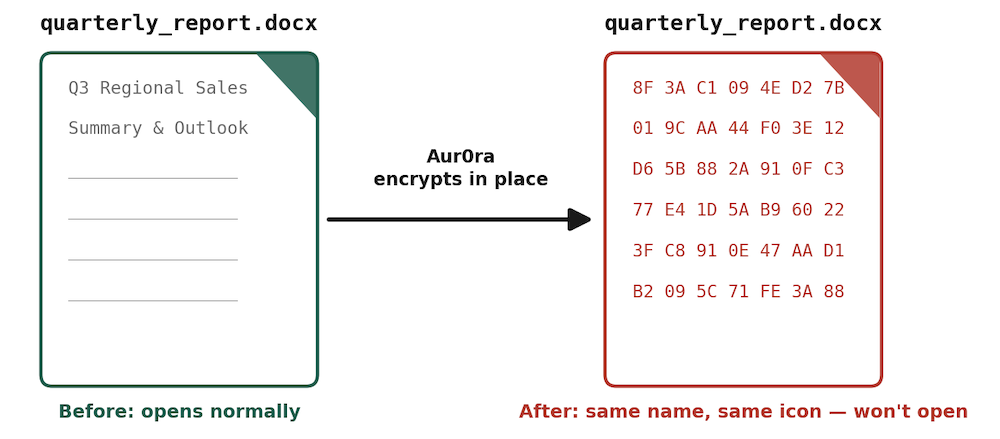
Figure 2: Same filename, same extension, same icon — only the bytes inside change
Anti-Recovery Playbook
Before or during encryption, Aur0ra runs a short, command sequence aimed at Windows' native recovery paths:
vssadmin delete shadows /all /quiet | wmic shadowcopy delete
vssadmin resize shadowstorage /for=C: /on=C: /maxsize=401MB
schtasks /Change /TN "\Microsoft\Windows\SystemRestore\SR" /Disable
Shadow copies are deleted twice, through two different tools, then the shadow storage quota is starved so future ones can't stick — and the System Restore task is disabled outright. These commands can be observed during the static analysis of the binary.
Encryption Engine & Ransom Note
A brief process-hollowing step (suspended process, remote thread resume) gets the encryption logic running under a trusted-looking host process. From there, a multi-threaded worker pool built on the Windows CryptoAPI tears through user profiles, Program Files, and Public folders. Over 3,000 files were touched in one run during our tests. These files were encrypted in place without ever renaming the file or changing its extension. The note !!!README!!!DO_NOT_DELETE.txt is then carpet-bombed into nearly every directory touched, so it surfaces no matter where a victim looks first. No DNS, HTTP, or TCP activity was seen at any point — this locker never phones home.
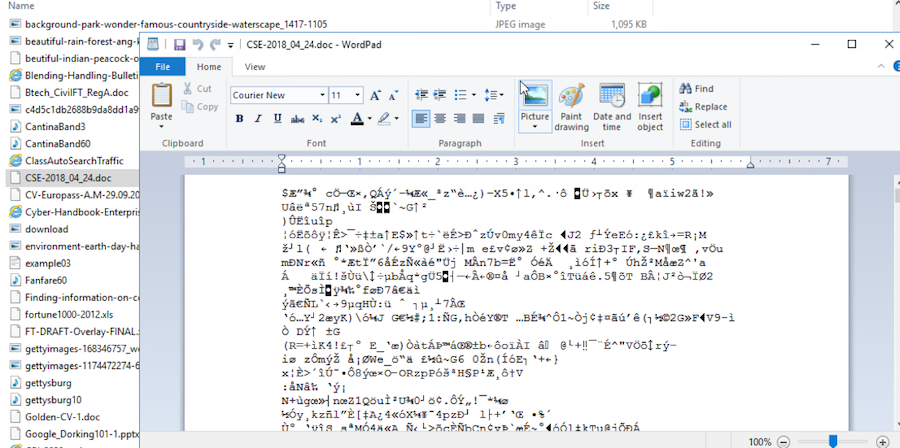
Figure 3: Encrypted files retain their original name, extension, and icon but return garbled content when opened.
Indicators to Monitor for Cohesity Admins
- !!!README!!!DO_NOT_DELETE.txt appearing across many directories on one host in a short window.
- Files with correct icons/extensions in Explorer that fail to open natively ("corrupt"/"unsupported format").
- vssadmin delete shadows /all /quiet, wmic shadowcopy delete, or schtasks /Change /TN "\Microsoft\Windows\SystemRestore\SR" /Disable executed from cmd.exe in quick succession.
- A sharp, unplanned spike in file WRITE/DELETE requests across a host.
|
Indicator |
Value |
|---|---|
|
Encryptor SHA256 |
81ca5fc6b55accdbc44266d66bd72c7c4152a75b215593adc433d51250054333 |
|
Encryptor MD5 |
fa0913bfe83efe092998da70975b5918 |
|
Encryptor Imphash |
2a18ed1f0638874d776afcc7d7079aff |
|
Archive dropper SHA256 |
96f74d96418fb3e12e4894a4d97dcd432f97a2978c09d69b4c1763a1d9c26987 |
|
Ransom note filename |
!!!README!!!DO_NOT_DELETE.txt |
|
Forged PE compile timestamp |
2041-08-26 18:18:35 (UTC) |
|
Tactic |
Technique(s) |
|---|---|
|
Discovery |
T1082 System Information Discovery, T1057 Process Discovery, T1083 File/Directory Discovery |
|
Privilege Escalation |
T1055 Process Injection, T1548 Abuse Elevation Control Mechanism |
|
Defense Evasion |
T1027 Software Packing, T1070.006 Timestomp, T1036 Masquerading |
|
Execution |
T1059 Command and Scripting Interpreter, T1202 Indirect Command Execution |
|
Impact |
T1486 Data Encrypted for Impact, T1490 Inhibit System Recovery |
1. Do not rely solely on Shadow Copies
Confirm no recovery workflow depends on Volume Shadow Copies alone — Aur0ra deletes, starves, and disables them in one pass.
Verify Tier-0/Tier-1 Windows protection policies run independent of any host-local recovery mechanism.
2. Lock Down Immutability
- Enable DataLock (WORM) on Windows-covering Protection Groups with retention beyond your detection-to-decision window.
- Require Quorum for destructive operations; confirm FortKnox vault copies are current and isolated.
3. Scan Snapshots for signs of encryption or dormant malware
- Rapid Threat Hunt: match the hashes and ransom-note filename above, plus the vssadmin/wmic/schtasks command artifacts.
- Anti-Ransomware scan: entropy detection matters more than extension checks here — Aur0ra never renames files.
- Customers can enable Rapid Threat Hunt and Anti-Ransomware scan by purchasing the Cohesity Enterprise bundle.
4. Prove Recovery Works Without Shadow Copies
- Identify and legal-hold the last known-good snapshot before any suspected compromise window. Use the Rapid Threat Hunt scan results to pinpoint the last clean snapshot, then apply a Legal Hold to it so it can't be deleted or expired while under investigation.
- Run a recovery drill assuming shadow copies and System Restore are both gone. Don't just take backups, take regular restores on a scheduled cadence (e.g., quarterly) and confirm each one succeeds before you need it.
Conclusion
Aur0ra demonstrates how ransomware can adapt its tactics to evade detection and carry out silent encryption. It also reflects the growing trend of ransomware targeting operating system backup mechanisms such as shadow copies and System Restore. As a result, backup administrators should rely on immutable, independently retained backup data rather than mechanisms that can be altered or disabled. Recovery efforts should depend on a clean, verifiable recovery point protected by sound policies, regardless of whether shadow copies remain intact or file extensions appear unchanged.
For the latest malware advisories, adversary updates, and technical details, visit Cohesity REDLabs at https://www.cohesity.com/platform/redlab/.

Start your 30-day free trial or view one of our demos.